
How this converter works
eDPI, short for effective DPI, is your mouse DPI multiplied by your in-game sensitivity. It lets two players compare their settings even if one uses 800 DPI and the other 1600.
The calculator also shows cm/360: how far your mouse travels to turn a full circle. That is the number that decides how aiming feels.
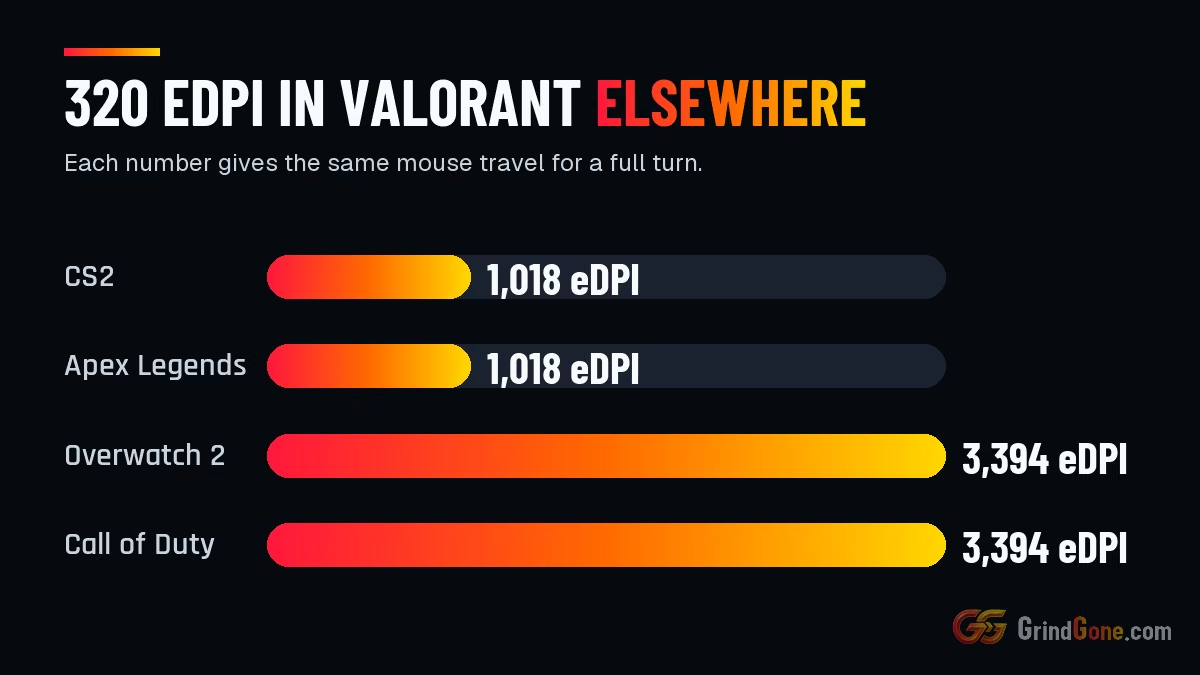
eDPI only compares players inside one game. Valorant turns 0.07 degrees per count, CS2 and Apex Legends 0.022, and Overwatch 2 and Call of Duty 0.0066, so the rows convert your eDPI to the number that gives the same turn in each of them.
eDPI = mouse DPI × in-game sensitivity. cm/360 = 360 ÷ (eDPI × yaw) × 2.54. Yaw: Valorant 0.07, CS2 and Apex Legends 0.022, Overwatch 2 and Call of Duty 0.0066.
Worked examples
Valorant 0.4 at 800 DPI is 320 eDPI, about 40.8 cm for a full turn.
The same turn in CS2 needs about 1,018 eDPI, for example 1.27 at 800 DPI.
CS2 1.0 at 800 DPI is 800 eDPI, which matches about 251 eDPI in Valorant.
| Scenario | Answer |
|---|---|
| Valorant 0.4 at 800 | 320 eDPI in Valorant, a full turn is 40.8 cm of mouse travel |
| CS2 1.0 at 800 | 800 eDPI in CS2, a full turn is 52 cm of mouse travel |
| Apex 1.6 at 1600 | 2,560 eDPI in Apex Legends, a full turn is 16.2 cm of mouse travel |
Tips that save time
- Pick a DPI you are happy with and leave it. Change only the in-game sensitivity.
- If you overshoot targets, lower your eDPI. If you run out of mouse pad turning, raise it.
- Turn off mouse acceleration in Windows and in the game, or eDPI stops meaning anything.
- Copying a pro? Match their eDPI, not their sensitivity, unless you also use their DPI.